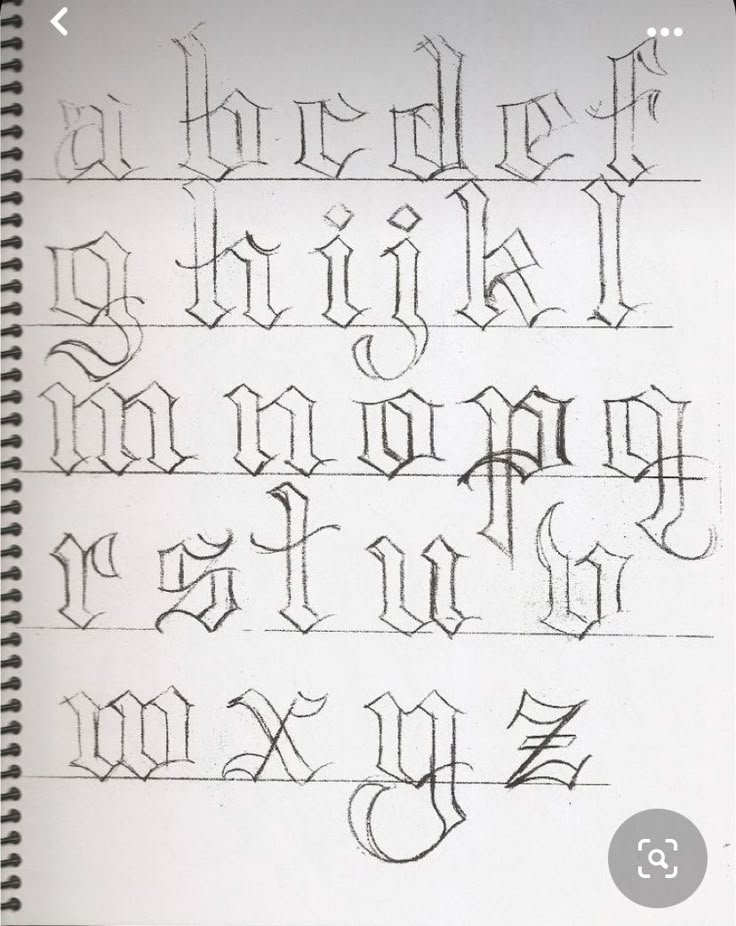
For decades, the raw energy and vibrant personality of graffiti letters have transformed urban landscapes into dynamic art galleries. But what if you're keen to tap into that iconic street style without years of can control practice or the daunting blank wall? Enter the graffiti letter generator—a powerful digital tool that, when used effectively, can be an incredible asset for artists, designers, and enthusiasts alike. It's not just about typing a word and hitting 'generate'; it's about understanding the art form, leveraging technology, and then infusing your own creative spark.
Ready to unlock authentic street style from your screen? Let's dive in.
At a Glance: Your Quick Guide to Graffiti Generators
- Understand the Art: Learn the core components (fill, outline, 3D, etc.) and popular styles of graffiti letters.
- Pick the Right Tool: Choose a generator based on its style variety, customization options, and output formats.
- Master Customization: Go beyond defaults by tweaking colors, outlines, shadows, and backgrounds to personalize your text.
- Bridge Digital & Physical: Use generated designs as a blueprint for sketching, digital art, or even spray paint practice.
- Avoid Pitfalls: Don't over-rely on generators; use them as a learning and inspiration tool, not a replacement for fundamental skill.
- Stay Legal & Ethical: Respect copyright, understand permissions for physical art, and give credit where due.
The DNA of Street Style: Understanding Graffiti Letters
Before you even touch a graffiti letters generator, a quick immersion into the soul of graffiti lettering is crucial. This isn't just about cool fonts; it's a rich artistic language with a history tracing back to the late 1960s in New York City. Pioneers like Taki 183 and Phase 2 laid the groundwork, pushing boundaries from simple "tags" to intricate bubble letters and wildstyle masterpieces that gained global recognition throughout the '80s and '90s. Artists like Banksy, Revok, and SEEN continue to evolve the art form, showcasing the power of letters to communicate, provoke, and adorn.
To truly "get" graffiti, whether you're drawing it or generating it, you need to grasp its fundamental building blocks:
- The Fill: This is the main color or pattern inside the letter. Think vibrant gradients, intricate textures, or even simple, solid blocks of color. It's the letter's personality.
- The Outline: The line that surrounds the letter's edge. A strong outline makes your letters pop and stand out from the background. It defines the form.
- The Background: While not always part of the letter itself, the area around the letter is often designed to complement or contrast, making the letters truly shine.
- The 3D Shadow: This adds incredible depth, making letters appear to leap off the surface. It's about shading and perspective, giving a realistic, "popping" effect.
- Keylines: Often thin, sharp lines (frequently white) that trace just inside or outside the main outline, adding extra definition and a professional finish.
- Highlights: Small, bright spots or streaks that simulate light reflection, making the letters appear glossy, wet, or shiny.
Understanding these components will empower you to move beyond basic generator settings and sculpt truly unique digital pieces.
Why Turn to a Graffiti Letter Generator? Beyond the Canvas
So, why bother with a digital tool when graffiti is so intrinsically linked to physical walls and spray cans? A graffiti letters generator isn't a replacement for traditional skills; it's an accelerator and an inspiration hub.
- Speed and Efficiency: Need a striking title for a presentation, a custom graphic for a social media post, or a unique logo quickly? A generator can produce complex lettering in minutes, saving hours of manual sketching and coloring.
- Inspiration and Idea Generation: Feeling stuck? Generators offer a vast library of styles—from classic "throw-ups" to intricate "wildstyle"—that can spark new ideas or show you how different elements combine. It's like having a digital brainstorm partner.
- Learning and Experimentation: For beginners, generators can be an invaluable learning tool. You can see how different outlines, fills, and 3D effects are applied without having to master complex drawing techniques first. Experiment with color palettes, letter spacing, and visual weights effortlessly.
- Digital Mock-ups and Pre-visualization: Planning a larger piece? Generate your design first to visualize how it will look. This allows for endless revisions before committing to paint, saving time and materials.
- Accessibility: Not everyone has access to art supplies, studio space, or the physical dexterity required for complex hand-drawn graffiti. Generators democratize the creation process, opening up the art form to a broader audience.
Picking Your Digital Palette: Choosing the Right Generator
The digital landscape offers a growing number of graffiti letters generator options. Selecting the best one for your needs depends on a few key factors:
- Style Variety: Does the generator offer a range of traditional and modern graffiti styles? Look for options like:
- Tags: Stylized signatures.
- Throw-Ups: Quick, bubbly letters.
- Old School/Block Letters: Bold, readable, and foundational.
- Bubble Letters: Rounded and playful.
- 3D Letters: For realistic depth.
- Wildstyle: Complex, interconnected, and abstract.
- Blockbusters: Large, impactful letters for maximum visibility.
- Calligraffiti/Script/Gothic/Pixação: For more niche, blended, or culturally specific aesthetics.
A wider selection means more creative freedom. - Customization Depth: Can you just pick a style, or can you fine-tune every element? The best generators allow you to adjust:
- Individual letter shapes and spacing.
- Fill colors, gradients, and patterns.
- Outline thickness, color, and multiple layers (e.g., inner and outer outlines).
- Shadow depth, direction, and color.
- Highlight placement and intensity.
- Background elements.
- Output Options: How can you save your creation? Look for generators that offer:
- High-resolution image downloads (PNG, JPG) for digital use.
- Vector graphics (SVG) for scalability and professional design work (e.g., logos, print). This is crucial if you plan to manipulate the design further in software like Adobe Illustrator.
- User Interface & Ease of Use: Is the generator intuitive? Can you quickly find the customization options and see your changes in real-time? A user-friendly interface makes the creative process enjoyable, not frustrating.
Your Step-by-Step Blueprint: Using a Generator Effectively
Using a graffiti letter generator is more than just typing your name. It's a structured approach to digital artistry.
Start with Your Text & Initial Style
- Input Your Text: Begin by typing the word or phrase you want to stylize. Keep it concise, especially when exploring complex styles.
- Choose a Base Style: Most generators offer a gallery of predefined styles. Browse through them and select one that catches your eye or aligns with your project's vibe. Don't be afraid to try multiple options to see what works best for your chosen text. For beginners, starting with Old School or Bubble Letters can provide a solid foundation for understanding basic letter structure before tackling Wildstyle.
Dive Deep into Customization: Color, Form, & Dimension
This is where the magic happens and where your understanding of graffiti's building blocks truly pays off.
- Fill It Up: Main Colors & Patterns:
- Experiment with vibrant color combinations. Try contrasting colors for impact, or use analogous colors for a smoother blend.
- Look for gradient options. A two-tone gradient running across your letters can add dynamic energy.
- Some advanced generators allow for texture overlays or simple patterns within the fill.
- Define Your Edges: Outlines & Keylines:
- Play with outline thickness. A thicker outline often makes letters more impactful, especially for Blockbusters.
- Choose a contrasting color for your outline to make the fill stand out. Black is classic, but white or a complementary color can be striking.
- If available, add inner or outer keylines. A thin white keyline can give your letters a professional, polished edge.
- Add Depth: Shadows & 3D Effects:
- Select a shadow direction (usually top-right, bottom-left, etc.).
- Adjust shadow depth. Too shallow, and it won't pop; too deep, and it might look clunky.
- Choose a shadow color. Often, a darker shade of the outline or fill color works well, but a completely contrasting color can create a dramatic effect.
- If the generator offers a full 3D effect, experiment with perspective to make your letters truly stand off the page. This is fantastic for adding dimension to any style.
- Flashes of Brilliance: Highlights:
- Add small, strategic highlights. These are usually white or a very light color.
- Think about where your imaginary light source is coming from and place highlights accordingly to create a sense of realism or sheen.
- Frame Your Art: Backgrounds:
- Consider the background color or pattern the generator offers. Sometimes, a plain background allows your letters to shine. Other times, a textured or graphically simple background can enhance the overall piece.
Refine, Preview, and Download
- Iterate and Refine: Don't settle for the first iteration. Tweak colors, adjust shadows, try different outlines. A graffiti letters generator makes experimentation effortless. Remember to ensure your letters are consistent in size and flow naturally across the canvas, avoiding overcrowding.
- Preview: Always use the preview function to see your design in its full glory before downloading. Check for any awkward overlaps, color clashes, or elements that don't quite work.
- Download: Save your final design in the highest resolution available. If you have vector options (SVG), grab those for maximum flexibility in other design software.
Beyond the Screen: Bringing Generated Letters to Life
A graffiti letter generator is a powerful starting point, but the true artistry often comes in what you do next.
Sketching & Tracing: From Digital to Paper
Your generated design can serve as a perfect blueprint for traditional drawing.
- Print It Out: Print your generated design (or display it on a screen).
- Basic Shapes: Start by lightly sketching the basic outline of your letters onto paper, mimicking the generator's initial structure. Don't skip this initial pencil sketch, as it’s fundamental to good design.
- Add Style: Gradually add the details: curves, arrows, extensions, guided by your generated image.
- Refine & Outline: Erase guide lines, refine shapes, and then trace your refined design with a black marker or pen.
- Color & Effects: Use markers, paint pens, or even watercolors to replicate the colors and effects (shadows, highlights) from your digital design. This helps you build muscle memory and understand the components in a hands-on way.
Digital Art Integration: Photoshop, Procreate, Illustrator
If your generator provides vector output (SVG), you're in an even better position for advanced digital manipulation:
- Adobe Illustrator: Import SVG files into Illustrator to fully customize shapes, colors, and add complex effects. Vectors are infinitely scalable, making them perfect for logos, large-format prints, or merchandise.
- Procreate/Photoshop: Import high-resolution PNGs into these programs. You can then add further digital painting, textures, backgrounds, or integrate your generated letters into larger digital compositions. This is ideal for creating digital posters, album art, or social media graphics.
Physical Mediums: Markers, Paint Pens, Spray Paint
For those aspiring to the wall, generators can aid in pre-visualization and planning.
- Practice Piece: Use your generated image as a guide for smaller practice pieces on legal surfaces like canvas, plywood, or designated graffiti walls.
- Tools: For smaller pieces, markers and paint pens are excellent. For larger works, familiarize yourself with spray paint and different spray caps to achieve varying line widths and effects.
- Safety First: Always remember that spray paint requires proper ventilation and protective gear (gloves, masks). And critically, always prioritize safety and respect by using legal spaces for your art. Creating graffiti on unauthorized property is illegal and comes with significant consequences.
Cultivating Your Voice: How Generators Can Boost Your Unique Style
The goal isn't just to use a generator; it's to use it to grow as an artist and develop your own distinct flair.
- Practice Makes Perfect (with Generator Assistance): Consistent practice is key. Use generators to quickly prototype ideas, then try to replicate them by hand. This iterative process accelerates learning.
- Experiment Fearlessly: Generators remove the "risk" of permanent mistakes. Play with colors you wouldn't normally combine, try styles you find challenging, and push the boundaries of letter manipulation. This experimentation will broaden your creative horizons.
- Analyze and Adapt: Look at professional designs, both online and locally. Analyze how artists use color, flow, and dimension. Then, use your generator to deconstruct those elements, apply them to your own text, and understand the mechanics.
- Don't Just Copy, Create: While generators can mimic styles, true artistry comes from infusing your personality. Use the generator as a launchpad, then add your unique twists, whether it's a specific flourish, a custom texture, or an unexpected color palette. Stay true to yourself; your art should reflect you.
Navigating the Nitty-Gritty: Common Pitfalls & Ethical Use
Like any powerful tool, generators come with responsibilities and potential traps.
The Trap of Over-Reliance: Don't Skip the Basics
One of the biggest mistakes is letting the generator do all the work. If you only use a generator without understanding the fundamental principles of letter structure, flow, and composition, you'll struggle to create truly original or adaptive work. Always follow the advice to start with basic shapes and consistently practice your hand-drawing skills; the generator is a supplement, not a replacement. Rushing the process and not taking the time to refine your designs, even digitally, will lead to less impactful results.
Inconsistent Styles & Overcrowding
Generated pieces can sometimes suffer from a disjointed look if elements from different styles are mashed together without careful consideration. Similarly, overcrowding letters—either digitally or on paper—diminishes their individual impact and makes the entire piece hard to read. Use the generator's flexibility to ensure smooth flow and balance between letters.
Respect the Roots: Copyright & Attribution
While you generate your own text, the style itself might be heavily influenced by or directly mimic existing fonts or famous artists' styles. Be mindful of potential copyright issues if you plan to use generated designs commercially, especially if they closely resemble proprietary fonts or iconic works. If you're inspired by a specific artist or style, giving credit is good practice.
Keep it Legal: Public vs. Private Property
This cannot be stressed enough: creating physical graffiti on public or private property without explicit permission is illegal. Always practice your art legally. Utilize designated graffiti walls, participate in community art projects, or create art on canvas and other legal surfaces. The generator allows you to create without these restrictions, making it an excellent tool for responsible exploration.
Frequently Asked Questions About Graffiti Generators
Are graffiti letter generators free to use?
Many basic graffiti letter generators are free for personal, non-commercial use, often supported by ads. More advanced generators with extensive customization or high-resolution vector exports might offer premium subscriptions or one-time purchase options. Always check the terms of service.
Can I sell art I create with a generator?
This depends on the generator's terms of service and the originality of your final piece. If you've used a free generator and created a unique design that doesn't infringe on existing copyrights, you might be able to. However, if the style is proprietary or you're using elements that are trademarked, you could face legal issues. For commercial use, investing in a generator with clear commercial rights or creating a significantly modified original piece is advisable.
How can I make my generated letters look more "authentic"?
Focus on subtle imperfections, layered textures, and natural color variations. Use slightly distressed outlines, add drips or splatters in post-production (if integrating into digital art software), and layer different shades for shadows. Studying real-world graffiti and trying to replicate those nuances with the generator's tools will help immensely.
What's the best style for beginners using a generator?
For beginners, Old School and Bubble Letters are excellent starting points. They have clear, readable structures that make it easier to understand how fills, outlines, and simple 3D effects are applied. Once comfortable, you can gradually move to more complex styles like Throw-Ups or experiment with basic 3D Letters.
Your Next Tag: Actionable Steps to Get Started
You've got the knowledge; now it's time to put it into action. Using a graffiti letters generator isn't just a gimmick—it's a gateway to understanding and creating powerful urban art.
- Start Simple: Begin by generating your name or a short word in Old School or Bubble Letters. Focus on solid fills and clear outlines.
- Focus on Consistency: Pay attention to how the generator maintains consistent letter size, spacing, and flow. Try to emulate this consistency if you transition to hand-drawing.
- Practice, Practice, Practice: Use the generator to experiment with colors and effects you might not consider manually. Then, try to replicate those designs through sketching. This dual approach will rapidly improve your skills.
- Explore and Experiment: Don't be afraid to click every button and try every option your chosen generator offers. The more you play, the more you'll understand the possibilities and find your own digital groove.
The world of graffiti is dynamic and vibrant, and with a graffiti letter generator as your co-pilot, you're well-equipped to explore its depths, create compelling designs, and ultimately, discover your own authentic street style. Get generating!